

Understanding Variables and Types in Python
Understanding Variables and Types in Python
Introduction
In Python, variables are used to store data values. They act as placeholders for different types of information, such as numbers, text, or collections of data. Understanding variables and their types is essential for writing efficient and effective Python code. In this blog post, we will explore the concept of variables and the different types available in Python. Python is dynamically typed, so you don't need to declare a type.
A variable is a reserved memory area (memory address) to store value
Variables are containers for storing data values. unlike other programming languages Python has no command for declaring a variable A variable is created the moment your first assigned a value to it. The variable does not need to be declared with any particular type and can even change type after they have been yet
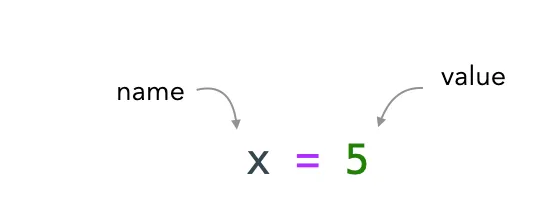
Variables are containers for holding data and they’re defined by a name and value.
Python is completely object-oriented, and not “statically typed”. You do not need to declare variables before using them or declare their type. Every variable in Python is an object
Sections
-
Hello, World
-
Reading in User Input
-
Indentation
-
Variables and their Importance
-
Variable Naming Conventions
-
Data Types in Python
-
Getting help in Python
-
Conclusion
Section 1-Hello, World
The simplest directive in Python is the "print" directive - it simply prints out a line (and also includes a newline, unlike in C).For example, one difference between Python 2 and 3 is the print statement. In Python 2, the "print" statement is not a function, and therefore it is invoked without parentheses. However, in Python 3, it is a function and must be invoked with parentheses.
#To print a string in Python 3, just write:
print("This line will be printed.")
print("Goodbye, World!")
Section 2- Indentation
Python uses indentation for blocks, instead of curly braces. Both tabs and spaces are supported, but the standard indentation requires standard Python code to use four spaces. For example
x = 1
if x == 1:
    # indented four spaces
    print("x is 1.")
x = 1
if x == 1:
Section 3- Reading in User Input
Now let's go a step further and read in some input from the user using the `input()` function. You should always prompt the user to let them know what they should input.
Here’s a simple program that takes in the user’s name as input and greets them.
Comments help improve readability of your code by providing additional context to the user. Single-line comments in Python start with a #.
Notice that the string in the code snippet below is preceded by an `f`. Such strings are called formatted strings or f-strings. To replace the value of a variable in an f-string, specify name of the variable within a pair of curly braces as shown:
# Get user input
user_name = input("Please enter your name: ")
# Greet the user
print(f"Hello, {user_name}! Nice to meet you!")
Section 4: Variables and their Importance
Variables play a crucial role in programming languages like Python. They allow us to store and manipulate data, making our programs dynamic and flexible. By assigning a value to a variable, we can easily refer to it throughout our code, making it easier to manage and modify.
In Python, variables are dynamically typed, which means that they can hold values of different types without explicitly declaring their type. This flexibility allows for easier code development but requires caution when dealing with variable assignments and operations.
Section 5: Variable Naming Conventions
In Python, variable names have certain conventions that should be followed for better code readability and maintainability. Here are some guidelines for naming variables in Python:
Variable names should be descriptive and meaningful.
They should start with a lowercase letter.
Avoid using reserved keywords as variable names.
Use underscores (_) to separate words in variable names for better readability.
A variable can have a short name (Like x and y) or a more descriptive name (age, total ).The rule for the Python variable
- 1- variable name must start with a letter or the underscore character
- 2- Variable name cannot start with a number
- Can contain letters, numbers, and underscores
- 3- A variable name can only contain alpha-numeric characters and underscore (A-z, 0–9, and _)
- 4- Variable names are case-sensitive (age, Age)
- Case-sensitive (Age ≠ AGE ≠ age)
- Use snake_case convention (my_variable)
Following these conventions will make your code more understandable to others and ensure consistency within your projects.
Section 6 -Variables and Types
Variables are containers for storing data values. unlike other programming languages Python has no command for declaring a variable A variable is created the moment your first assigned a value to it. The variable does not need to be declared with any particular type and can even change type after they have been yet
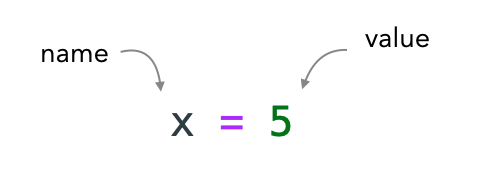
Variables are containers for holding data and they're defined by a name and value.
Python is completely object-oriented, and not "statically typed". You do not need to declare variables before using them or declare their type. Every variable in Python is an object.
x=5
y="john"
print(x)
print(y)
print (type(x))
# Basic variable assignment
age = 25
name = "Alice"
price = 99.99
is_python_fun = True
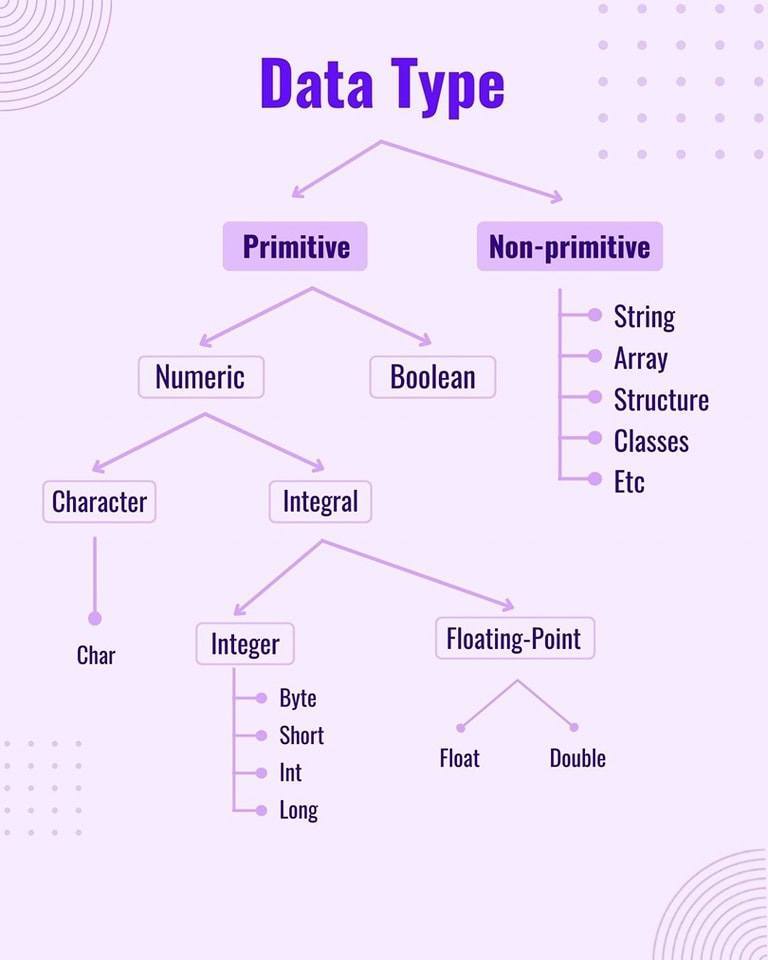
There are many different types of variables: integers, floats, strings, boolean etc.

6.1- Numbers
Python supports two types of numbers - integers and floating-point numbers. (It also supports complex numbers, which will not be explained in this tutorial).
To define an integer, use the following syntax:
myint = 7
print(myint)
#To define a floating point number, you may use one of the following notations:
myfloat = 7.0
print(myfloat)
myfloats = float(7)
print(myfloats)
6.2- Strings
Strings are defined either with a single quote or double quotes. The difference between the two is that using double quotes makes it easy to include apostrophes (whereas these would terminate the string if using single quotes)
mystring = 'hello'
print(mystring)
mystring = "hello"
print(mystring)
my_string = "Python is my favorite programming language!"
type(my_string)
len(my_string)
str.replace()
If you don’t know how it works, you can always check the help:
help(str.replace)
my_string.replace("a", "?")
print(my_string)
str.join()
pandas = "pandas"
numpy = "numpy"
requests = "requests"
cool_python_libs = ", ".join([pandas, numpy, requests])
print(f"Some cool python libraries: {cool_python_libs}")
str.upper(), str.lower(), str.title()
mixed_case = "PyTHoN hackER"
mixed_case.upper()
mixed_case.lower()
mixed_case.title()
6.3 Lists
Lists (list) are a versatile data type in Python that can hold multiple values of different types. They are ordered, mutable, and enclosed in square brackets ([]). You can perform various operations on lists, such as adding or removing elements, accessing specific items by index, or iterating over the entire list.

6.4 Tuples
Tuples (tuple) are similar to lists but are immutable, meaning they cannot be modified after creation. They are defined using parentheses (()) instead of square brackets. Tuples are often used when you want to store a collection of related values that should remain constant throughout the program execution.

6.7 Dictionaries
Dictionaries (dict) are key-value pairs used to store data in an unordered manner. Each value in a dictionary is associated with a unique key, allowing for efficient retrieval based on the key’s value. Dictionaries are enclosed in curly braces ({}) and consist of key-value pairs separated by colons (:)
The dict variable stores a dictionary with three key-value pairs. The first key-value pair is "name", which has the value "John Doe". The second key-value pair is "age", which has the value 30. The third key-value pair is "occupation", which has the value "Software Engineer".
You can access the values in a dictionary using the keys. For example, the following code will print the value of the "name" key:
6.7 Sets
Sets (set) are unordered collections of unique elements. They are useful when you want to eliminate duplicate values or perform mathematical set operations such as union, intersection, or difference between sets. Sets are defined using curly braces ({}) or the set() function. A set in Python is a collection of unique elements. This means that no element can appear more than once in a set. Sets are created using curly braces ({ }).
Section 7: Getting help in Python
Python has a built-in help() function, which in my opinion is an underused part of Python. I often use it first instead of searching the web [1].
It is used something like:
>>> help(dict)
>>> help> topics
>>>help> DICTIONARIES