

9-Understanding How Computers “See” Images in Computer Vision
Introduction
In the fascinating field of computer vision, machines are being trained to “see” and interpret images just like humans do. This technology has a wide range of applications, from self-driving cars to facial recognition systems. But have you ever wondered how computers actually perceive and understand images? In this blog post, we will dive into the intricacies of computer vision and explore the various techniques used by machines to “see” images.
Section 1. The Basics of Computer Vision
Computer vision is a subfield of artificial intelligence (AI) that focuses on enabling computers to understand and interpret visual data, such as images and videos. It involves capturing, analyzing, and processing visual information to extract meaningful insights. At the heart of computer vision lies the ability to recognize patterns and objects within images.
Section 2. Image Representation?
What ‘s an Image?
Def: An image is represented as a grid of pixels (an image is a 2D projection of a 3D scene). It is a continuous function of two coordinates in the image plane; usually expressed as (i,j) or (column/width, row/height) or somewhat confusingly (y,x).
Say an image has a resolution of 100 x 200, this would imply our image is represented as a grid of pixels, with 100 rows and 200 columns, with the width being represented as the number of columns and the number of rows representing the height of the image. And overall, there are 100 x 200 = 30,000 pixels in our image [2]
Def: An image is represented as a matrix of Pixel values. Each pixel can have different values depending on the image type.
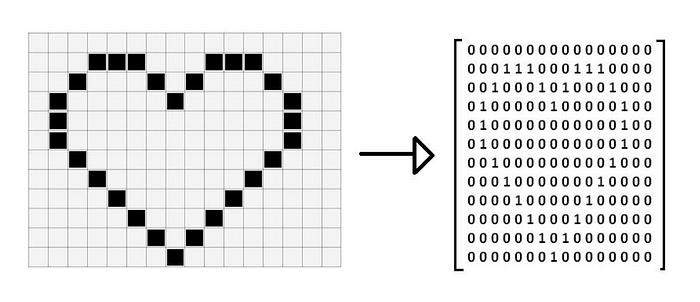
Def:A digital image is a representation of a two-dimensional image using numerical values that can be processed by a computer. Digital images are composed of pixels, which are the smallest units of the image, and each pixel has a specific value that represents its color or intensity.
Understanding Image Data
When working with digital images in computer vision, it's essential to understand how image data is structured and stored. Here are some key concepts:
-
Image Array: In Python, images are typically represented as multi-dimensional arrays using libraries like NumPy. Each element in the array corresponds to a pixel value.
-
Channels: For color images, the array has multiple channels (e.g., 3 channels for RGB). Each channel represents the intensity values for one color component.
-
Most image formats have three color "channels": Red, Green, and Blue (some images also have a fourth channel called "alpha" that controls transparency). For each pixel in an image, there is a value for every channel.
The way this is represented as data is as a three-dimensional matrix. The width of the matrix is the width of the image, the height of the matrix is the height of the image, and the depth of the matrix is the number of channels. So, as we saw, the height and width of our image are both 100 pixels. This means that the underlying data is a matrix with the dimensions 100x100x3.
What is a mean pixel
Def: The value of a pixel at any point corresponds to the intensity of the light photons striking at that point. Each pixel has a unique logical address, a size of eight bits or more depending on the color system gray or color. In a grayscale image, each pixel has a value between 0 and 255, where zero corresponds to “black” and 255 corresponds to “white”. The values between 0 and 255 are varying shades of gray, where values closer to 0 are darker and values closer to 255 are lighter.
Def: In digital imaging, a pixel (abbreviated px), or picture element is the smallest addressable element in an image, or the smallest addressable element in a dot matrix display device. In most digital display devices, pixels are the smallest element that can be manipulated through software.
Def: Pixel aka picture element (pix = picture, el = element) is the atomic element of an image. Pixels are combined to form a complete image, video, text, or any visible thing on a computer display.
Def: in the old television world that was called pells also for picture elements, but for computers, we have to be special so we call them pixels. Pixels hold measurements. Each pixel holds a measurement made by the sensor. For example, a common camera measures the amount (and possibly color) of the light hitting it over a spatial array (the image). A pixel is represented by a dot or square on any display screen. Every image is a matrix/grid and each square in the grid contains a single pixel.
Def: Pixel values are the most basic features in an image. Each pixel contains information about colour, intensity, and brightness. For grayscale images, each pixel is represented by a single value (power), while for coloured images, each pixel is represented by a combination of values (e.g., RGB values) [5]
Def: You might think of a complete image as a set that consists of small samples. These samples are called pixels. They are the smallest elements in any digital image. Have you ever zoomed in on an image to such an extent that you see small squares? Those are pixels. So, pixels are subsamples of an image that, when get combined, give us the complete image.
Def: Pixels: The smallest unit of a digital image. Each pixel represents a single point in the image and has a specific color or intensity value.

What is mean by Image Types
-
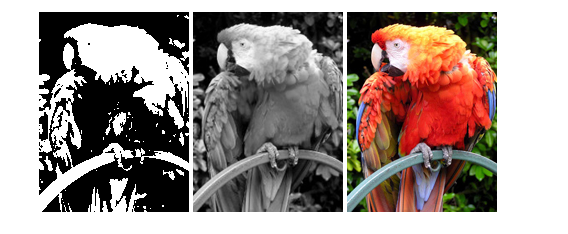
Binary Image (AKA 1bit Gray Scale): Consists of pixels with values 0 (for black) and 1 (for white). Useful for black and white document scanning.
-
Grayscale Image: Represented as a 2D array where each value corresponds to the intensity (0-255 for 8-bit image), ranging from black to white. Represents images in shades of gray. Each pixel value ranges from 0 (black) to 255 (white).
-
Color Image: It is represented as a 3D array. Include multiple channels (typically RGB). Each channel represent a different color component. Each channel is a grayscale representing the intensity level of that color. There are several popular Image Modes for color images in digital imaging. Represents images using three color channels. Each pixel has three values corresponding to the intensity of red, green, and blue components, ranging from 0 to 255.
What is mean by image Resolution
Def: The number of pixels in an image, usually expressed as width x height (e.g., 1920x1080). Higher resolution means more pixels and finer details in the image.
Def: Image resolution is the number of pixels present in an image. The greater the number of pixels, the better quality. Image resolutions are described, for example, as 320 × 240, 640 × 480, 800 × 600, 1024 × 768, and so on. This means, for example, that there are 1024 pixel columns and 768 pixel rows. The total number of pixels is obtained by multiplying both numbers, which gives us 786,432 pixels.
Concepts
Before delving into how computers “see” images, it is important to understand how images are represented in a digital format. Computers typically represent images as a grid of pixels, with each pixel containing information about its color and intensity. Images can be grayscale (black and white) or in color, where each pixel’s color is represented by three values for red, green, and blue (RGB) [2]
An image is a 2D array of numbers stored in a raster. Each cell in the raster is called a pixel. Every image that we see in this world is nothing, but an array of numbers with various value ranges depending on the colorspaces we are using. For example, for RGB colorspace, each change value has a range of 0–255, whereas the hue channel in the HSV channel has a range of 0–180 [2]. In, digital images in computer vision, we typically operate on discrete images, right, and that means we have to do two types of discretizations. First of all, we have to sample, the 2D space on a regular grid, that is we have discrete pixels at locations, you know

PPI and DPI
As noted at the beginning of the chapter, PPI means “pixels per inch” whereas DPI means “dots per inch.” They are the units for measuring image resolution. If we consider an inch of an image, the number of square pixels we are able to see inside it is represented by PPI. DPI, on the other hand, is related to printing. When we print an image and look at an inch of the print, the number of dots of ink used is represented by DPI.
Image Modes
It is used to change the mode of an image. The mode of an image defines the type and depth of a pixel in the image. Different modes support different types of images, and converting between them can be useful for various image processing tasks.
Common Image Modes in Pillow
- "1" (1-bit pixels, black and white, stored with one pixel per byte)
- Purpose: For creating binary images.
- Application: Document scanning, simple graphics.
- "L" (8-bit pixels, grayscale)
- Purpose: For grayscale images where each pixel is represented by a single byte.
- Application: Image processing tasks where color is not important, reducing image size.
- "P" (8-bit pixels, mapped to any other mode using a color palette)
- Purpose: For images with a limited number of colors (up to 256).
- Application: Saving storage space in image files, GIF images.
- "RGB" (3x8-bit pixels, true color)
- Purpose: For standard true-color images with red, green, and blue channels.
- Application: Most common for displaying images in full color.
Bitmap Images
Typically, pixel values are represented by a range of integers. However, converting these integers into bytes results in a bitmap image. A binary image is a type of bitmap where each pixel is assigned one of two values: zero or one, representing black or white, respectively. This format is frequently utilized for efficient image storage.
Section 3- Quantization.
A standard is 8 bits per pixel, so that pixel values range from 0 to 255. By convention, 0 represents black, 255 represents white, and the values in-between represent a greyscale. Note: in this class, we will only be working with grayscale images.

So we have to pick them at specific locations, the other thing is we have to quantize, each value, we don't get to have a continuous real value, we have some finite number of bits to represent that, so like we said, maybe have 8 bits, so it will go from zero to 255. These days, you tend to have 16-bit images or 12-bit or depending upon the device, but the idea is that it's quantized, to some level.
Even though, it's quantized, later we're going to tend to think of these things as floating point, and I'll tell you now, that if you compute with integer images like unsigned integer 8, 8 bits your code will just break, so, use floating point images. So in general, especially in MATLAB, which we'll be doing a lot of, images are represented as a matrix of values, typically integer values to start with .

so here's Phyllis, looking as delightful as ever, and, we index our matrices by, again, i and j, row and column, sometimes, x going over this way and y going that way, if I say some pixel i j it means row i column j, if I say some pixel at x y, all right, x y, x is horizontal so I have to go get the column that, so you'll have to swap them, and part of the problem is our math is always determined by x and y, and our computing is always determined by i and j, row and column, and, and that's a, a tension that we'll have. Sometimes we use 1D signals, 1D signals will just be an array of, of numbers as well. All right.


Section 4-What a computer sees
So far we’ve talked about functions from a mathematical perspective, but this is a computer and in a computer, everything has to be digital and that gives us even some more restrictions okay.

So let’s take a look at the grid that was a little chunk taken out of the Phyllis Diller picture. So here you see, in fact I had a little Matlab code right, it says pd. Pd Phyllis Diller. That was my array. And this says rows 40 to 60. Columns 30 to 40. And that’s the middle of Phyllis’s face. You might not have known it, but that’s the middle of Phyllis’s face. By the way, one of the things you should realize is this is exactly the same representation as the picture on the screen. But you happen to have a vision system that will look at bright dots and dark dots and see things. And when you look at these numbers, you don’t immediately see those things. Mathematically, these are identical. Oh, and by the way, something that I just mentioned, which is going to bite us in some place. These are rows and these are columns rows go down columns go over so x and y okay remember that we’re going to do that now.

3. Conclusion
Computer vision has made remarkable advancements in recent years, allowing machines to “see” and interpret visual data with increasing accuracy. Through techniques such as feature extraction, machine learning, deep learning, object detection, image segmentation, and image recognition, computers are becoming more proficient at understanding images just like humans do. As technology continues to evolve, computer vision will undoubtedly play a pivotal role in shaping various industries and revolutionizing our everyday lives.
In this blog post, we have explored the basics of computer vision, the representation of images in digital format, preprocessing techniques, feature extraction methods, and the role of machine learning and deep learning in this field. We have also touched upon important tasks like object detection, image segmentation, and image recognition. By understanding how computers “see” images in computer vision, we can appreciate the complexity behind this remarkable technology.