

10-Sampling High Frequency Signal
What Is Aliasing in Signal Processing? A Simple Explanation with Examples
Title Tag: What Is Aliasing in Signal Processing? Understanding Sampling and Anti-Aliasing Filters
Meta Description: Learn what aliasing is in signal processing, why it happens during sampling, and how anti-aliasing filters prevent distortion. Includes a simple real-world example and beginner-friendly Python code.
What Is Aliasing in Signal Processing?
Aliasing is a common problem in digital signal processing (DSP) that happens when a signal is sampled at a rate that's too low to capture its high-frequency content.
When this happens, high-frequency information gets mistaken for lower-frequency information. And once that mistake is made, it can't be fixed later.
This idea is important in areas like:
- Audio processing
- Digital photography
- Computer vision
- Video compression
- Telecommunications
- Machine learning applications involving signals
Let's break it down step by step.
Why Sampling Matters
Before a computer can process a real-world signal, the signal has to be converted into digital form.
For example:
- A microphone captures sound as a continuous analog signal.
- A camera captures continuous light.
- A sensor records continuous measurements.
To store and process these signals digitally, we take samples at regular intervals.
The challenge is that sampling only works correctly when the sampling rate is high enough.
What Happens When the Sampling Rate Is Too Low?
Imagine you're watching a spinning bicycle wheel in a movie.
Sometimes the wheel appears to:
- Spin slowly
- Stop completely
- Rotate backward
Even though it's actually spinning forward.
That's aliasing.
The camera isn't capturing enough frames per second to accurately represent the wheel's motion.
As a result, the motion is misinterpreted.
The same thing happens in signal processing.
When a signal contains frequencies higher than the sampling system can handle, those frequencies "fold back" into lower frequencies.
The system starts treating high-frequency information as if it were low-frequency information.
A Simple Real-Life Example
Suppose you're recording music.
The recording contains:
- A singer's voice
- Guitar sounds
- High-frequency cymbal crashes
If the sampling rate is too low, some of those high-frequency sounds may be recorded incorrectly.
Instead of appearing as high-frequency components, they show up as completely different lower frequencies.
The recorded audio no longer represents the original sound accurately.
And here's the important part:
Once aliasing occurs, you cannot recover the original frequencies.
The information has already been mixed together.
Understanding Aliasing in the Frequency Domain
In frequency-domain analysis, sampling creates repeated copies of a signal's frequency spectrum.
If the signal's frequencies stay within safe limits, those copies don't overlap.
Everything works correctly.
But when the signal contains frequencies that extend too far, the repeated spectra overlap.
That's where aliasing occurs.
The overlap causes:
- Frequency distortion
- Information loss
- Incorrect signal reconstruction
Once the overlap happens, the original and aliased frequencies become impossible to separate.
Why Aliasing Cannot Be Removed Later
A common misconception is that software can always fix sampling errors.
Unfortunately, aliasing doesn't work that way.
After sampling:
- The original high-frequency components are gone.
- The aliased frequencies are mixed into the signal.
- There's no reliable way to determine which frequencies were real and which were aliases.
The damage has already happened.
That's why prevention is more important than correction.
The Solution: Anti-Aliasing Filters
To prevent aliasing, engineers remove high-frequency content before sampling.
This is done using an anti-aliasing filter.
An anti-aliasing filter is typically a low-pass filter.
Its job is simple:
- Reduce or remove high frequencies.
- Keep frequencies that can be safely sampled.
- Prevent spectrum overlap during sampling.
A Gaussian filter is one common example used in image processing.
By reducing high-frequency components before sampling, the repeated spectra no longer overlap.
As a result:
- No aliasing occurs.
- The signal can be reconstructed accurately.
- Unwanted frequencies can be filtered out later.
How Audio CDs Use Anti-Aliasing
Audio recording systems provide a practical example.
The process looks like this:
- Capture analog sound from a microphone.
- Apply a low-pass (anti-aliasing) filter.
- Convert the signal into digital samples.
- Store the samples.
- Convert the samples back into analog sound during playback.
- Apply another low-pass filter to remove unwanted reconstruction artifacts.
Because the high frequencies were removed before sampling, the original audio can be reproduced much more accurately.
Visualizing the Idea
Without an anti-aliasing filter:
- High-frequency content remains.
- Spectrum copies overlap.
- Aliasing occurs.
With an anti-aliasing filter:
- High frequencies are reduced.
- Spectrum copies remain separated.
- Accurate reconstruction becomes possible.
So, as long as my frequencies are low enough, I'm okay. But what if they're not low enough, what happens? Well now, let's suppose I have higher frequency thing, so this is some random function, and it has some high frequency. So, here is its f of u, and you see its w goes out a little bit further. If now, I multiply that by the same comb of M, I'm going to convolve this thing with that 1 over M comb that I had before, and I'm going to get this part here.

Now remember, these things actually sum. I'm drawing each individual component, but in reality, this thing would sum and come back up here, all right? So, these things would sum and come back up there. And this area right here is where this is, essentially, this energy has folded back on itself, it's overlapped and then they're going to add, okay? That high frequency that was really this little edge thing here, okay? Or, it's the thing that's there, is pretending it's low frequency. That's the aliasing. And once you've aliased the signal, once you've done this operation, you cannot undo it. The high frequencies have pretended that they're low frequencies, and you can't separate them out from real low frequencies. You have to remove the high frequencies before you do the sampling, in order to remove the aliasing. So, how might you do that?
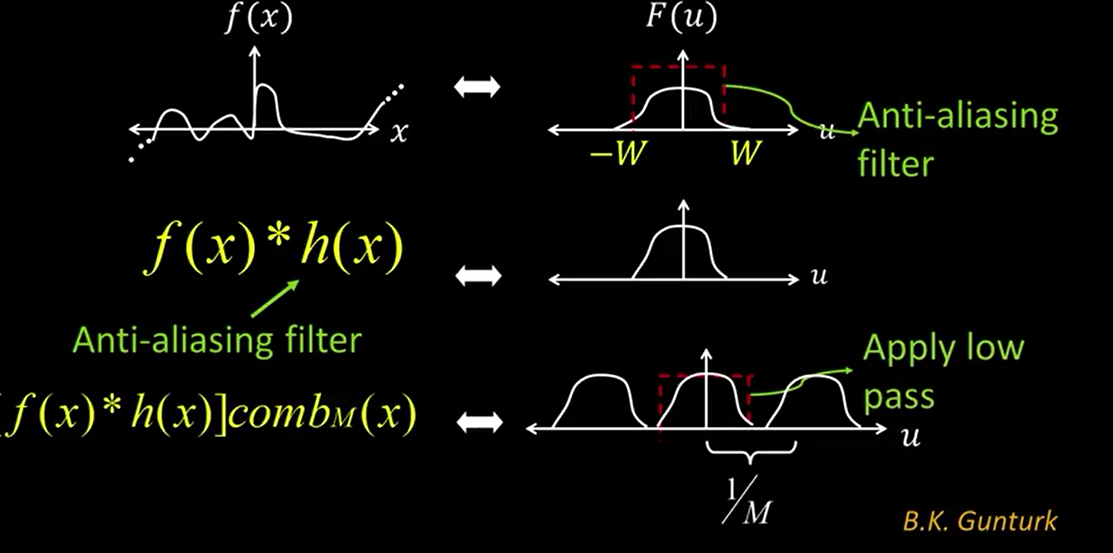
Okay. Well, how do you remove high frequencies? Well, we know how to do that. We convolve with h. Maybe its another Gaussian. What does that do? That reduces the high frequencies. So the, the frequency spectrum of the convolution of f and h. It has much less high frequency. So, that h is what's referred to as an anti-aliasing filter, and it has the net effect of trimming the high frequencies of the original signal. So that then, when I do the multiplication by the comb, which is shown here, right, I'm now convolving that with a comb filter in the frequency domain. But, I don't get that overlap, right? So no aliasing goes on, all right? And then to recover the signal, whatever I get after I reconstruct from that using the new sampled, convolved function, I can throw away any high frequencies because those are not real. As we, so just the way we did with the, the CD right? We, we low pass filtered the microphone. Did a A to D conversion to get some digital samples. We did a D to A conversion to get an analog. And we knew that any high frequency that showed up, that's not real. Okay, we could low pass that away and recover the original signal. So, that's summarized here in terms of aliasing. When I don't have an anti-aliasing filter, I get these overlap regions that cause me to get aliasings that I cannot remove once I've done it. But, with an anti-aliasing filter, I don't get that overlap. So, that's the mathematics behind aliasing.